Modeling Content Disarm and Reconstruction with the D3FEND Ontology
How we modeled content disarm and reconstruction techniques in D3FEND
Target Audience
Security Architects, Systems Security Engineers, Cyber Risk Engineers, Cyber T&E Engineers
Published: July 31, 2026, Last Modified: July 31, 2026
1.4.0
Authors
Content Disarm and Reconstruction (CDR) is a process that produces a sanitized, policy-compliant copy of an untrusted file through validation, removal or transformation of suspicious elements, and reconstruction. CDR serves as a risk-reduction control: it substantially lowers exposure to malware and other threats, but should not be considered a guarantee that content is safe.
An example application of CDR tools is processing incoming email attachments, such as Microsoft Office documents or PDFs, to reduce risk. The tool deconstructs and analyzes the untrusted file, validates its structure, removes or transforms risky elements, and then reconstructs the file with the remaining parts. This process ensures that only sanitized, policy-compliant content reaches the end-user.
CDR is most effective as one layer of defense alongside other controls such as email filtering, endpoint detection and response, and user awareness training. CDR can struggle with encrypted files, nested archives, unsupported formats, parser bugs, and fidelity loss when reconstructing content, so its limitations should inform its deployment within a layered defense strategy.
The D3FEND team has modeled components of the Content Disarm and Reconstruction pipeline. This blog post details the methodology and reasoning behind that work and depicts the resulting model in D3FEND CAD. The model is intended to help cybersecurity professionals understand CDR and apply its component techniques.
A Brief Introduction to D3FEND CAD Graphs
The D3FEND Cyber Attack-Defense (CAD) tool supports modeling and graphing use cases. The tool lets users drag and drop nodes representing ATT&CK and D3FEND techniques, digital artifacts, and other ontology classes. Each node can be populated with a specific class such as Web Application Firewall. Users can also draw edges between nodes to represent relationships between classes; the available edge options are prepopulated with relationships defined in D3FEND.
D3FEND CAD uses the D3FEND ontology to perform automated reasoning on certain types of nodes in CAD graphs. Starting from a digital artifact node, users can explore related offensive and defensive techniques and the full set of class inferences for that artifact. Likewise, users can start from a technique node and explore related artifacts. This feature helps users examine relationships and dependencies within cybersecurity scenarios, including potential vulnerabilities and mitigation strategies.
We hope D3FEND CAD supports visual modeling across a wide array of use cases and levels of granularity, from modeling a full adversary campaign to analyzing a malware sample. For more information, explore D3FEND CAD and select “Help” for documentation, or see our blog series for tips and tricks on building CAD graphs.
Methodology
In keeping with D3FEND’s broader methodology, we used domain literature and online resources to identify techniques used in CDR systems. We included techniques relevant to cybersecurity and excluded those outside that scope.
We organized the resulting techniques under the Content Filtering taxonomy, then defined their associated digital artifacts and relationships. Although D3FEND already included some relevant digital artifacts, this work required additional artifacts. In total, this work added 14 techniques and 38 digital artifacts to D3FEND.
Challenges
Although many vendors offer CDR products, publicly available technical documentation about the specific techniques those products use is limited. This can make detailed, implementation-level analysis difficult. This work attempts to address that gap by organizing publicly available information about CDR techniques and their relationships to relevant digital artifacts.
Deconstructing CDR
Content Disarm and Reconstruction (CDR) is not modeled as a single D3FEND technique. Instead, it is an orchestrated process that can include the following stages:
- verification
- content extraction and inspection
- sanitization
- augmentation
- reconstruction
Among the discrete steps in a CDR pipeline, extraction, inspection, and reconstruction are not inherently security-related because they can occur regardless of whether content is malicious. In this D3FEND modeling work, we focused specifically on three security-enforcing functions: validation, modification, and quarantine. These techniques directly enforce compliance with a security-focused Content Policy. Reconstruction can also be security-relevant when rebuilding content from known-good structures drops invalid, unreferenced, or disallowed objects.
Content Filtering is organized around these three sub-techniques:
- Content Validation checks whether the content adheres to the security policy
- Content Modification brings content into compliance by removing, replacing, or converting elements
- Content Quarantine separates non-compliant content from the normal processing flow
This organization allows CDR implementations to combine techniques according to the content type and security policy.
Interactive CDR Technique Graph — Drag to pan; scroll or pinch to zoom.
Open the full interactive graph ↗File Format Verification Deep Dive
File Format Verification is an important step during Content Validation that safeguards against adversaries masquerading file types (T1036.008). We wanted to expand on that and provide a few specific techniques to verify file formats with greater technical detail. Publicly available vendor resources focused specifically on CDR provided limited technical detail about these techniques, so we also drew on published work in digital forensics, particularly file carving.
A common file-verification technique is File Magic Byte Verification, which checks whether a file’s magic number matches its declared type. Because an adversary can spoof the magic number, additional techniques such as File Metadata Consistency Validation check for inconsistencies in metadata declarations.
Interactive File Format Verification Graph — Drag to pan; scroll or pinch to zoom.
Open the full interactive graph ↗New Digital Artifacts
These new CDR techniques required corresponding additions to the D3FEND ontology. Although File and File Section already existed, we expanded File Section with the following subclasses to support more detailed and accurate modeling of file structures:
Within D3FEND, File Header Block, File Content Block, and File Footer Block are specializations of File Section, which represents a portion of a file. Header and footer blocks may contain metadata. File Header Block Signature and File Footer Block Signature represent the byte sequences used to identify and validate the corresponding sections. Content blocks contain the primary file data and, depending on the format, may also contain metadata.
These artifacts support abstract modeling across file types. The figure below applies these abstractions to a ZIP file. It maps concrete ZIP header, data, and end-of-central-directory regions on the left to D3FEND artifact classes on the right.
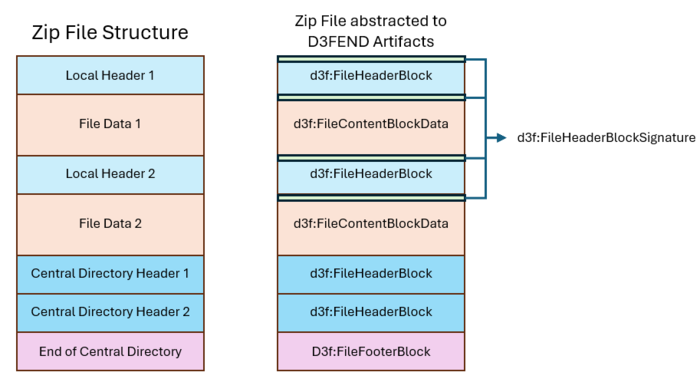
A D3FEND signature class abstracts the role of an identifying byte sequence; an actual ZIP record realizes that abstraction using the four signature bytes shown in the table below, in on-disk order.
| ZIP record | D3FEND signature class | Signature bytes |
|---|---|---|
| Local file header | File Header Block Signature | 50 4B 03 04 |
| Central directory file header | File Header Block Signature | 50 4B 01 02 |
| End of central directory record | File Footer Block Signature | 50 4B 05 06 |
In the D3FEND model, a File Header Block may contain a File Header Block Signature, and a File Footer Block may contain a File Footer Block Signature. These class relationships are shown in the interactive CDR Digital Artifact Graph below.
Within a File Content Block, D3FEND represents the payload as File Content Block Data. The interactive CDR Digital Artifact Graph below also includes note nodes with PDF and PE32 modeling examples. Scroll or pinch to zoom in and read those notes, or open the full interactive graph for a larger view. Together, these examples demonstrate how the expanded ontology can represent structures across different file types.
Interactive CDR Digital Artifact Graph — Drag to pan; scroll or pinch to zoom.
Open the full interactive graph ↗Conclusion
The holistic diagram of our CDR modeling work appears in the interactive D3FEND CAD graph below.
We hope this blog post shares insights from our research into CDR techniques and artifacts and demonstrates how D3FEND CAD can be used to model them. We believe this work advances the understanding and modeling of CDR concepts and techniques for cybersecurity practitioners. We welcome feedback from the cybersecurity community through our GitHub page.
Interactive Complete CDR Graph — Drag to pan; scroll or pinch to zoom.
Open the full interactive graph ↗Resources
CDR & File Format CAD Graphs:
See the associated D3FEND ontology additions in this GitHub Pull Request.